前言
年初制定的全年计划中有一项是在博客中增加“足迹”的功能,用以丰富博客内容,同时提醒自己中国大好河山,趁年轻出去走走。最近看到有大佬已经完美在hugo上实现,这不紧跟大佬的步伐也给我的博客安装上“足迹”功能。
正文
步骤1:申请并配置高德key
-
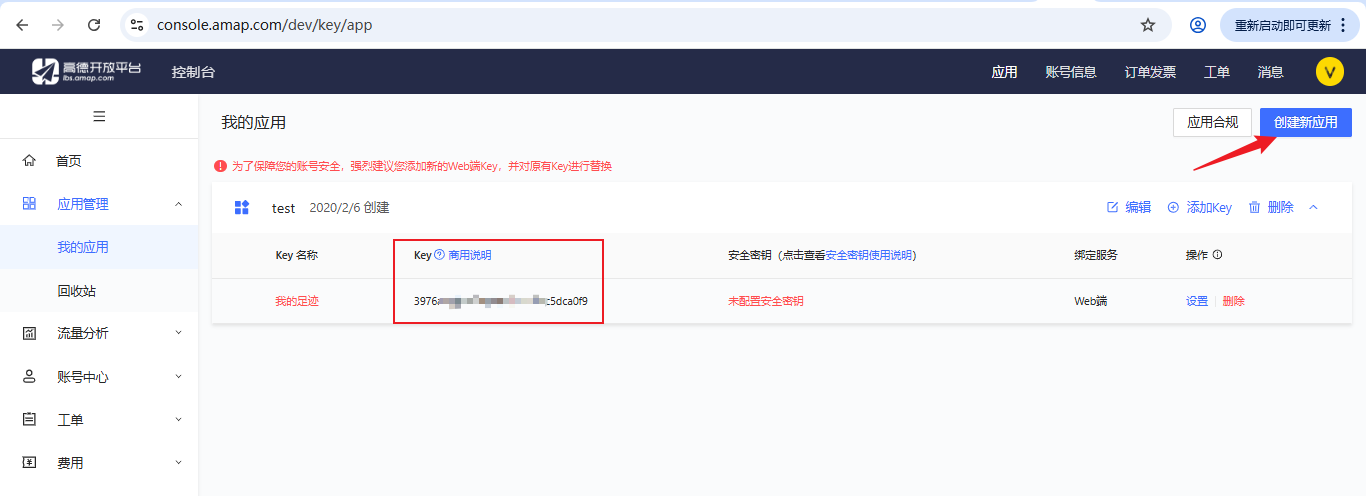
注册并申请高德KEY注册地址
-
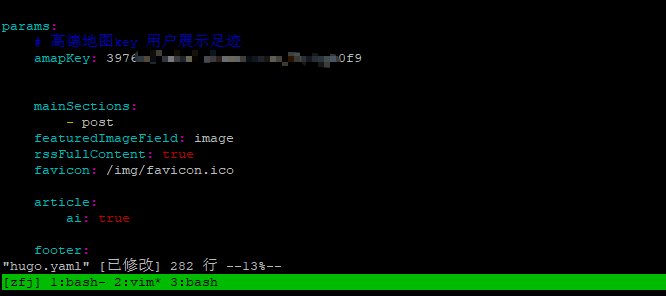
在hugo.yaml中配置key
vim hugo.yaml
  params
    # 高德地图key 用户展示足迹
    amapKey: 397xxxxxxxxxxxxxxxxxca0f9
步骤2:安装大佬的插件
- 安装shortcode短代码
创建你的博客项目/layouts/shortcodes/footprintmap.html
{{- $id := printf "footprintmap-%d" (now.UnixNano) -}}
{{- $height := .Get "height" | default "520px" -}}
{{- $data := .Get "data" | default "/data/footprints.json" -}}
{{- if and (not (hasPrefix $data "http")) (not (hasPrefix $data "//")) -}}
  {{- $data = relURL $data -}}
{{- end -}}
{{- $key := .Get "key" | default .Site.Params.amapKey -}}

<!-- 大佬教程中没有这一行,但是我实践过程中必须引入,否则地图将无法正显示 -->
<link rel="stylesheet" href="/css/footprintmap.css">

<div id="{{ $id }}" class="footprint-map" data-json="{{ $data }}" data-amap-key="{{ $key }}" style="height: {{ $height }};">
  <div class="footprint-map__loading">正在加载足迹...</div>
  {{- if not $key -}}
    <div class="footprint-map__error">请在 <code>params.amapKey</code> 配置高德 Web JS API Key,或通过 <code>key</code> 覆盖。</div>
  {{- end -}}
</div>
{{- if not (.Page.Scratch.Get "footprintmap-script") -}}
  {{- .Page.Scratch.Set "footprintmap-script" true -}}
  <script src="{{ "/js/footprintmap.js" | relURL }}" defer></script>
{{- end -}}
- 安装css / javascitp / footprints.json数据模板
wget https://github.com/Jiosanity/XiaoTen-FootprintMap/archive/refs/tags/v1.2.0.zip
unzip v1.2.0.zip
cp XiaoTen-FootprintMap-1.2.0/static/css/* 你的博客项目/static/css/
cp XiaoTen-FootprintMap-1.2.0/static/js/* 你的博客项目/static/js/
cp XiaoTen-FootprintMap-1.2.0/static/data/* 你的博客项目/static/data/
步骤3:配置“足迹”菜单
参考hugo博客网站优化中“菜单栏增加项目”
mkdir -p 你的博客项目/content/page/footmap/

vim index.md

---
title: 足迹
menu:
    main:
        weight: -45
        params:
            icon: footsteps
ai: false
---
\{\{< footprintmap height="560px" >\}\} #请去掉转义符
# 创建图标
vim 你的博客项目/content/assets/icons/footsteps

<svg xmlns="http://www.w3.org/2000/svg" width="24" height="24" viewBox="0 0 24 24" fill="none" stroke="currentColor" stroke-width="2" stroke-linecap="round" stroke-linejoin="round" class="icon icon-tabler icons-tabler-outline icon-tabler-foodsteps">
	<path stroke="none" d="M0 0h24v24H0z" fill="none" />
	<path d="M4 16.5a2.5 2.5 0 0 0 5 0a1.5 1.5 0 0 0 -1.5 -1.5h-2a1.5 1.5 0 0 0 -1.5 1.5" />
	<path d="M15 18.5a2.5 2.5 0 0 0 5 0a1.5 1.5 0 0 0 -1.5 -1.5h-2a1.5 1.5 0 0 0 -1.5 1.5" />
	<path d="M8.52 12h-4.04c-.348 0 -.678 -.179 -.823 -.496c-1.326 -2.904 -.774 -8.504 2.843 -8.504s4.17 5.6 2.843 8.504c-.145 .317 -.475 .496 -.824 .496" />
	<path d="M19.52 14h-4.04c-.348 0 -.678 -.179 -.823 -.496c-1.326 -2.904 -.774 -8.504 2.843 -8.504s4.17 5.6 2.843 8.504c-.145 .317 -.475 .496 -.824 .496" />
</svg>
步骤4:配置个性化“足迹”数据
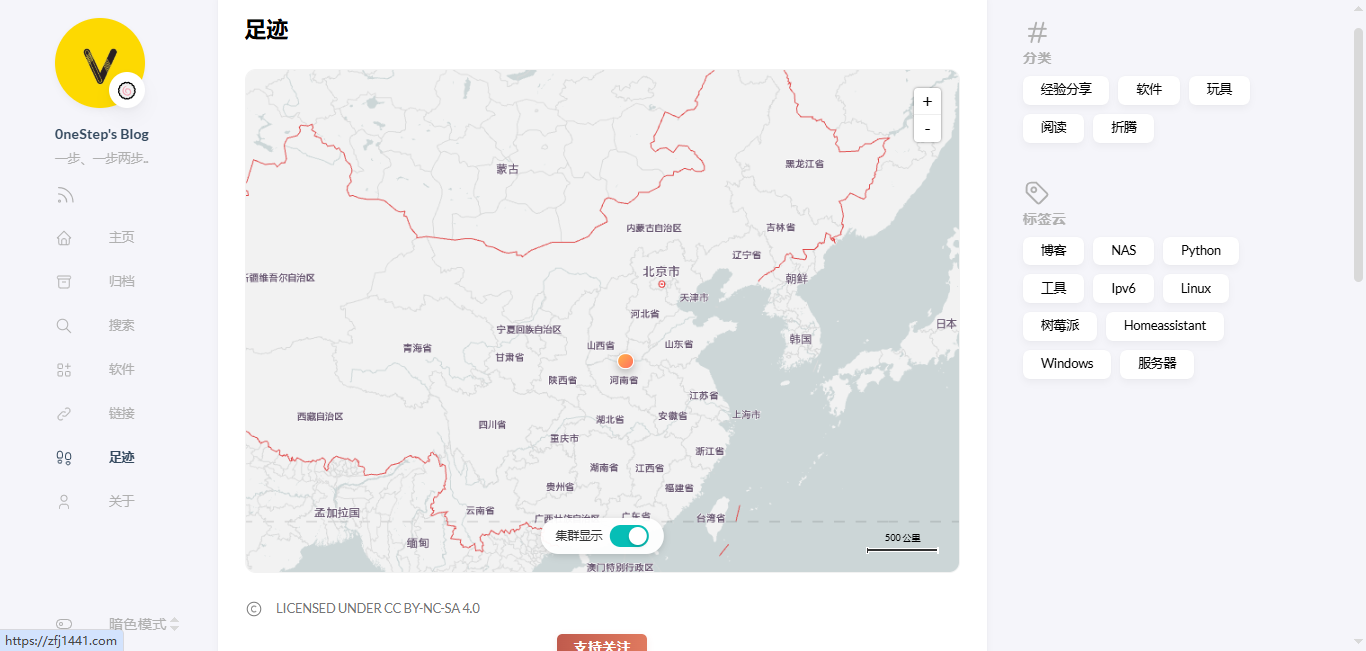
根据大佬提供的配置工具修改自己的 static/data/footprints.json,然后部署
总结
大佬的“足迹”插件效果非常帮,使用也非常方便,赞!!!